
NO. 06 · The Journal
A free coffee timer that remembers what worked
Brew the bag you've got, save what worked, and do it again tomorrow.
JACK - FOUNDER · · 8 min read
You make a really good cup. Sweet, balanced, exactly what you wanted.
The next morning you try to do it again and realise you have no idea what you did. Was it 15 grams or 16? Was the grinder on 18 or 20? Did you pour it all at once or in stages?
Your memory is a terrible place to keep a grind setting.
So BeanScore now has a Brew Timer. It's a free coffee timer and ratio calculator for espresso, V60, AeroPress and French press, and it does the one thing most brew timers don't. It remembers which coffee you were brewing.
Most coffee timers forget the most important bit
There are plenty of good brew timer apps. Most of them give you a stopwatch, a list of methods and a library of recipes, and some of them do that really well.
The thing is, a recipe on its own only gets you so far. The same V60 recipe that's perfect for a chocolatey Brazil can taste flat with a bright Kenyan. What you actually want to remember isn't just how you brewed. It's how you brewed THIS coffee.
And if the timer doesn't know what's in the bag, it can't help you with that.
Brew the bag you've already got
When you start a brew on BeanScore, you can link the coffee you're using. Pick it from the coffees you've rated, the ones you've favourited, or search the whole BeanScore catalogue. If you'd rather not, you can skip it and just brew.
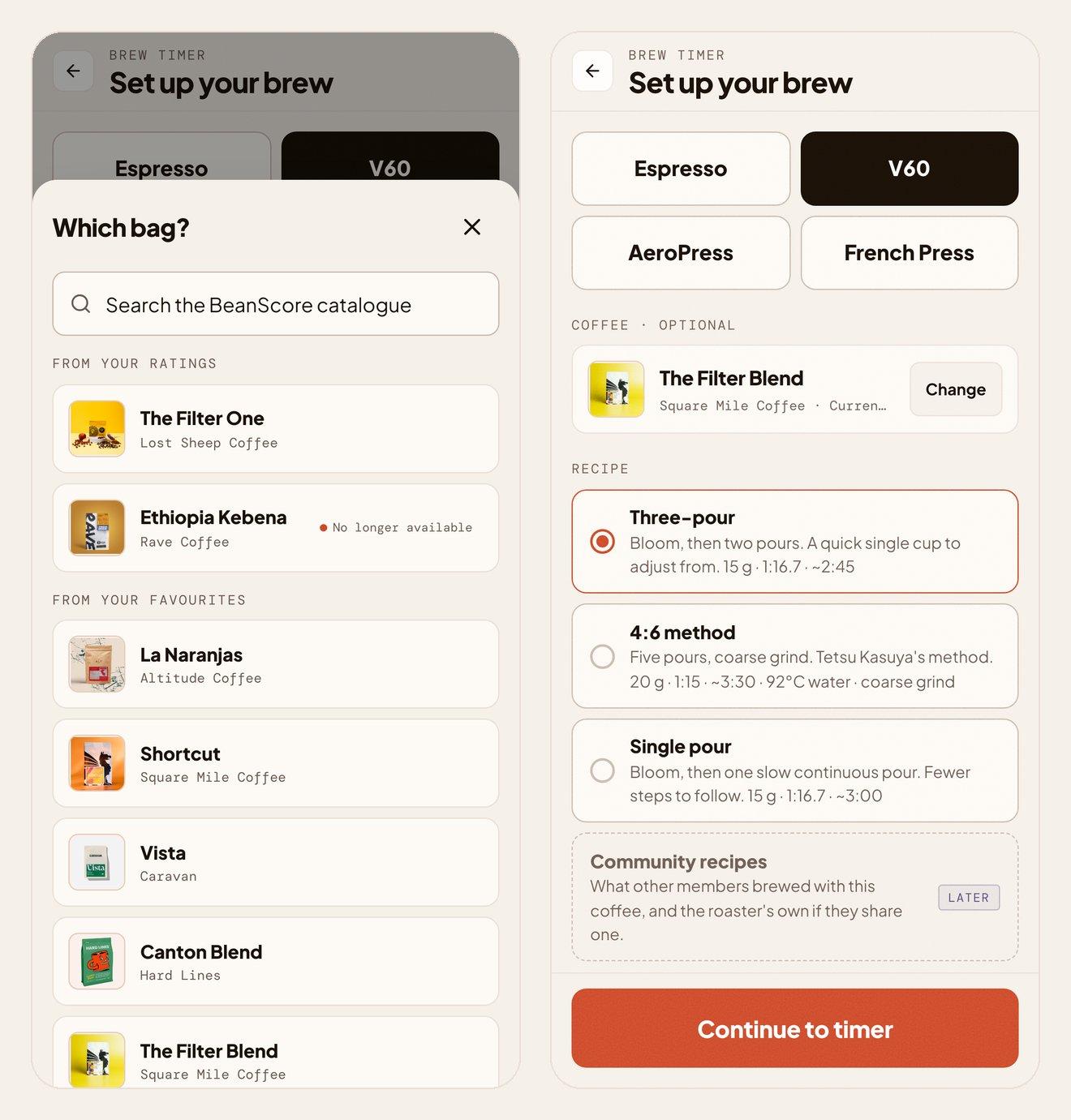
Linking it is what makes everything afterwards useful. Your settings are saved against that coffee, so next time you open the same bag, your best brew for it is waiting.
Roasters also change their coffees from one harvest to the next. So a brew is saved against the version of the coffee you actually had, and if the roaster updates it later, your old settings are labelled as being from an earlier release rather than passed off as current. That matters more than it sounds, as I wrote about in Coffee discovery has a stale data problem. And if a coffee you've logged sells out, you can still brew the bag you've got.
How the Brew Timer works
- Choose your method. Espresso, V60, AeroPress or French press.
- Link your coffee. Optional, but it's the bit that pays off later.
- Pick a recipe. Your own best brew if you've saved one, or a starting recipe to adjust from.
- Follow the timer. It shows the time, what to do now, what's coming next, and for pour-over, what your scale should read as you pour.
- Save what worked. Your time, yield, grind setting and a quick note on how it tasted.
The timer is built to be read from across the kitchen, with big numbers and big buttons, optional sound cues when a step changes, and the screen kept awake while it runs on phones that allow it. It works in your phone's browser, and on a laptop if that's where you brew.
A coffee ratio calculator, built in
A brew ratio is just how much water you use for each gram of coffee. 1:16 means 16 grams of water for every gram of coffee. It's the single most useful number in home brewing, because it lets you scale any recipe up or down without changing how it tastes.
In the Brew Timer you don't have to do the maths. Change the dose and the water updates, and so does every pour target in the recipe. Fancy a bigger mug? Add a few grams and the whole recipe follows.
As a rough guide to where people usually start:
- Espresso: around 1:2.
- Ristretto: shorter and more concentrated, roughly 1:1 to 1:1.5.
- Filter, including V60: usually somewhere around 1:15 to 1:17.
- French press: often about 1:16 to 1:17.
None of those are rules. They're where most recipes begin, and the right one for you depends on the coffee and on what you like.
Espresso ratio: start at 1:2 and taste
For espresso, the ratio is the weight of coffee in the basket against the weight of liquid in the cup. Put 18 grams in, stop the shot at 36 grams out, and that's 1:2.
The Brew Timer works out your target yield from your dose, for a standard espresso or a ristretto, then runs a big, simple stopwatch with that target on screen the whole time. A common starting point is a shot of around 25 to 32 seconds, and you'll see that window marked as the shot runs. Hit Stop, weigh what's in the cup, and adjust the final yield if it overshot.
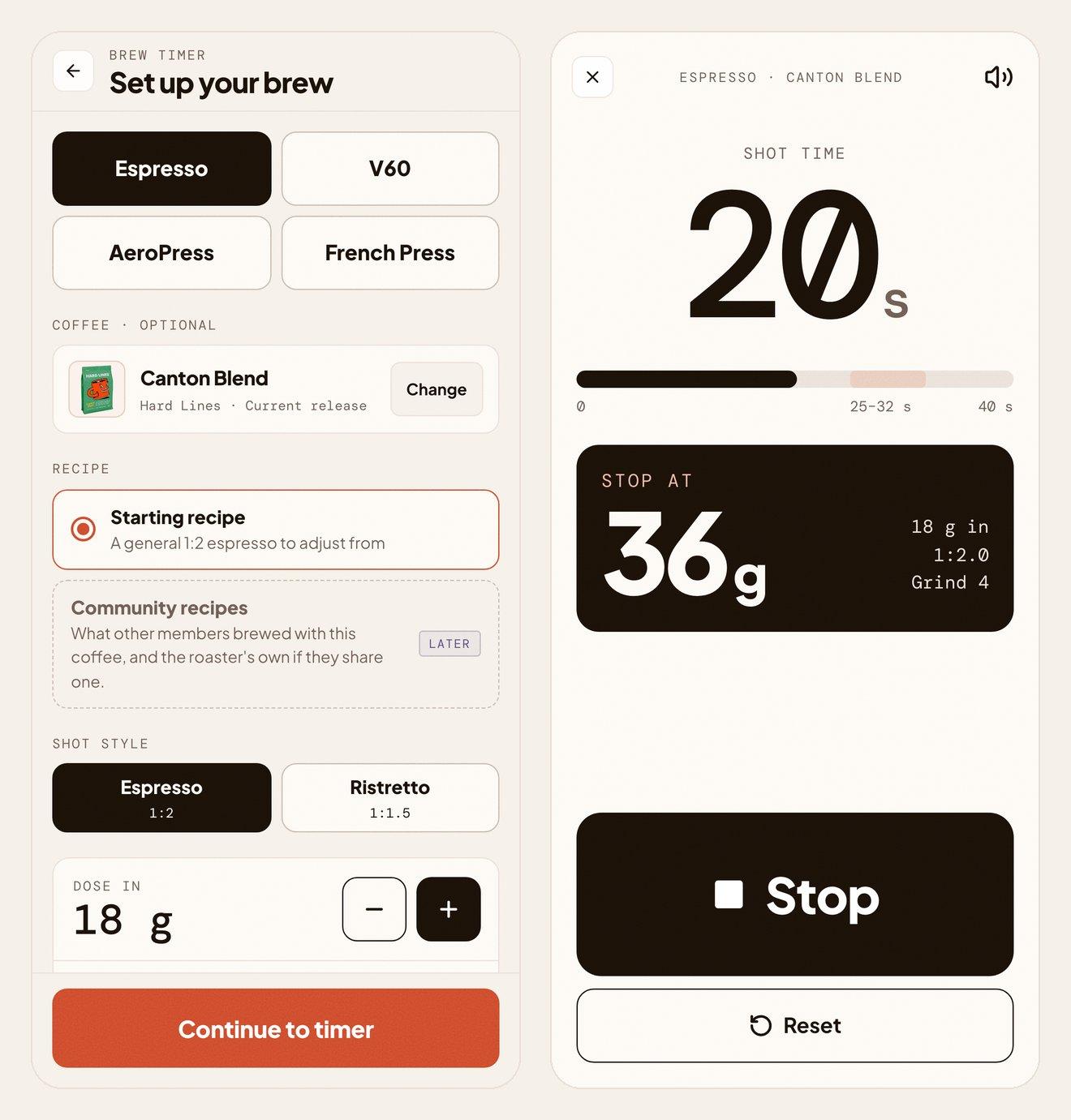
Three V60 recipes, one timer
Pour-over is where a timer earns its keep, because the timing of each pour matters. There are three V60 recipes to start from:
- Three-pour. 15 grams of coffee to 250 grams of water. A bloom to 45 grams, then up to 150 grams at 0:45 and 250 grams at 1:15, aiming to finish around 2:45. A quick single cup to adjust from.
- The 4:6 method. Tetsu Kasuya's recipe from his 2016 World Brewers Cup win. Five pours, 20 grams to 300 grams at 92°C with a coarse grind. The first 40% of the water shapes sweetness against acidity, the last 60% shapes strength. Done around 3:30.
- Single pour. A bloom, then everything else in one slow, steady pour. Fewer steps to think about.
While you pour, the timer shows the cumulative target in big numbers, and a line underneath tells you what the scale should be reading right now. So instead of guessing your pour rate, you just match the number.
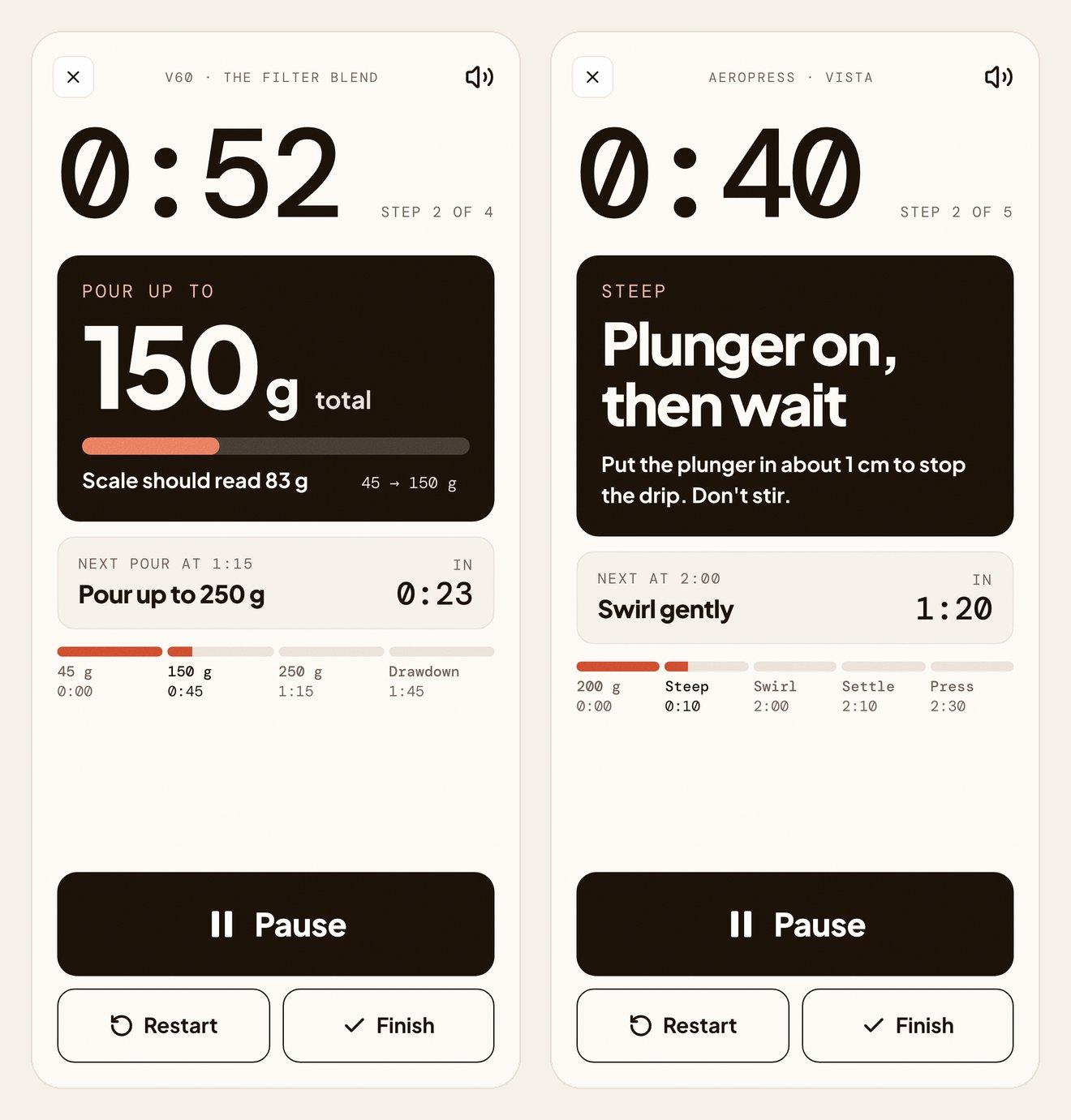
James Hoffmann's AeroPress recipe, without the fuss
For AeroPress, the Brew Timer uses James Hoffmann's Ultimate AeroPress technique. It's one of the most widely shared AeroPress recipes around, and it's refreshingly simple. 11 grams of coffee, medium-fine, and 200 grams of water just off the boil, with the AeroPress the normal way up.
- Pour all the water, then put the plunger in about a centimetre to stop it dripping.
- Wait until 2:00, without stirring.
- Give it a gentle swirl.
- At 2:30, press slowly all the way down, over about 30 seconds.
No rinsing, no preheating, no flipping it upside down. The timer walks you through each step and counts down to the next one.
French press, but patient
The French press recipe is James Hoffmann's too, and it's a slower one. That's the point. 30 grams of coffee, medium-coarse, to 500 grams of water just off the boil.
- Pour the water and leave it alone for four minutes.
- Stir the crust on top two or three times, then spoon off the foam and floating bits.
- Leave it to settle for at least five minutes. Longer is fine.
- Lower the plunger just to the surface, not into the coffee, and pour gently, leaving the last bit in the pot.
Waiting that long feels wrong the first time. It's worth it. The settling is what gets you a cleaner, less silty cup.
Save what worked. Brew it again tomorrow.
This is the bit I care about most.
When a brew finishes, you get the actual time, a place to record your grinder setting, and three buttons for how it tasted: sour, balanced or bitter. Pick one and you get a plain suggestion for next time, like grinding a little finer if it came out sour. Then save it.
If it was a good one, mark it as your best brew. Next time you brew that coffee the same way, it loads first. And on the Brew Timer home screen, your last saved brew sits there with a big Brew again button. One tap and you're back on the timer with yesterday's settings.
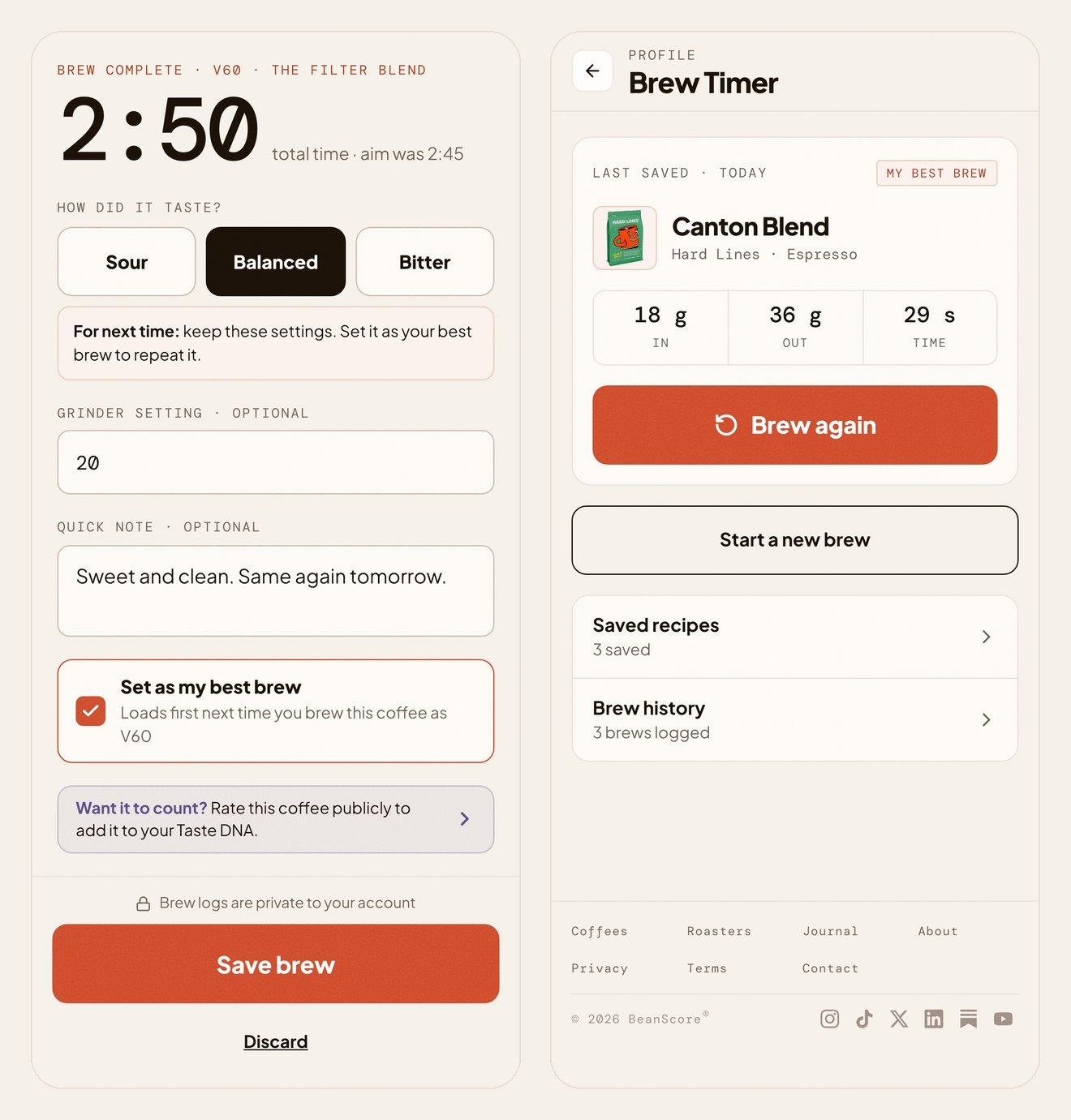
If you want to tweak something for one morning, there's Adjust for today. Change what you like and brew. Your saved recipe stays exactly as it was.
Your brews are private to your account. They don't feed into public ratings or your Taste DNA. If you want a coffee to count, you rate it the normal way.
Make better coffee at home, one note at a time
Better coffee at home rarely comes from one big change. It comes from small adjustments you can actually remember. A click finer on the grinder. Two grams more coffee. Stopping the shot a little sooner.
That's the whole idea behind the Brew Timer, and it's the same idea behind the rest of BeanScore. Your past coffee should help with your next one. Rating coffees builds your Taste DNA and helps you find the next bag. The Brew Timer helps you get the best out of the bag you've already bought.
Is the Brew Timer free?
Yes. The only thing you need is a BeanScore profile, so your brews have somewhere to be saved, and creating one is free. Once you're in, you'll find the Brew Timer on your profile.
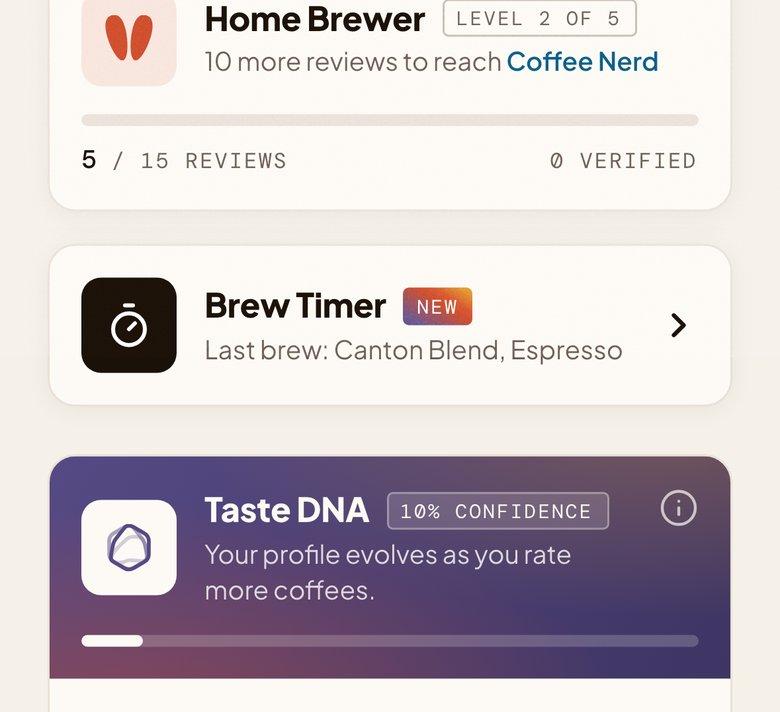
It's totally free, have a look.